📞 +44 (0)116 2787812  |  ✉ sales@iviewdata.com
Authorised Magewell Supplier — UK | Product Finder | Compatible Software | My Account
Home Products Solutions Resellers Support Knowledge Base & Guides Find My Product Blog Contact Us Login / Register
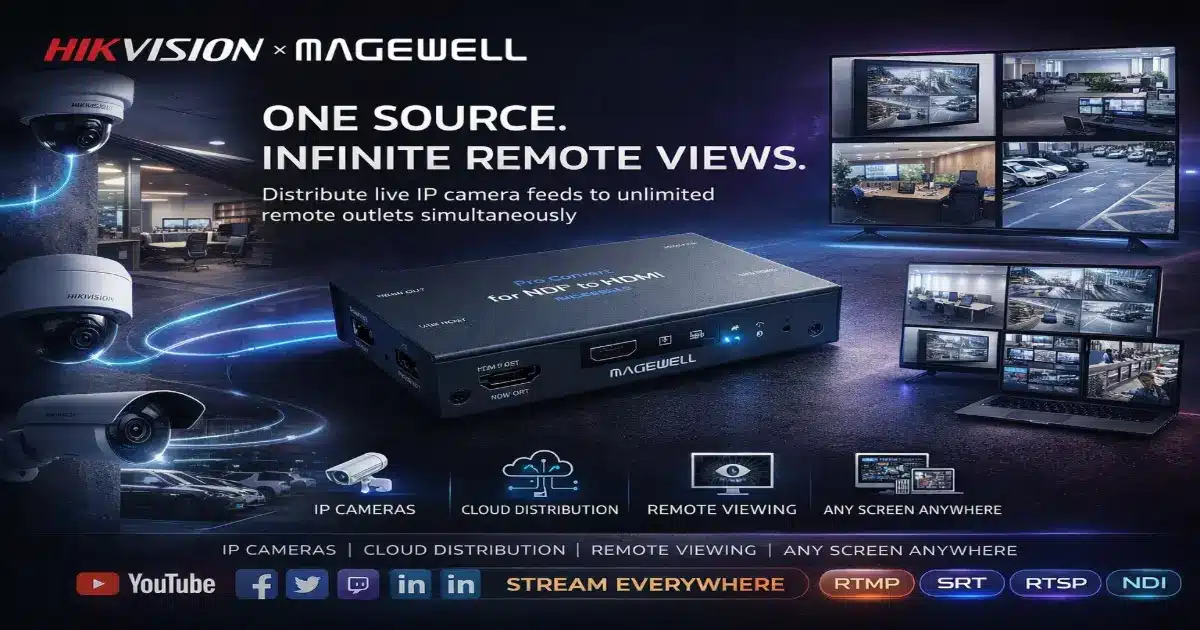
One source infinite remote views — Hikvision IP cameras distributed to multiple remote outlets simultaneously using Magewell Pro Convert IP to HDMI multiviewer and cloud architecture — iView Data Ltd authorised UK supplier
Hikvision Magewell IP Video Architecture Guide

One Source. Infinite Remote Views.
Hikvision & Magewell IP Camera Distribution

The challenge: You have Hikvision IP cameras at your main site and you need staff at five different remote offices, branches or departments to be able to watch those camera feeds live — on a normal TV screen, without buying five expensive PCs, without complex software, and without overloading your internet connection. This guide explains exactly how to do it using a cloud-based architecture and the Magewell Pro Convert IP to HDMI hardware decoder.

What Is the Magewell Pro Convert IP to HDMI?

Before we get into the architecture, it helps to understand what the Magewell Pro Convert IP to HDMI actually does — because it's the key piece of hardware that makes this whole solution possible.

In simple terms, it is a small standalone hardware box that connects to your network via Ethernet and outputs video to a TV or monitor via HDMI. You don't need a PC, you don't need any software installed, and you don't need any technical knowledge to operate it day-to-day.

What makes it particularly powerful is its built-in multiviewer capability — which we'll explain in detail below.

What Is a Multiviewer — and Why Does It Matter?

A multiviewer takes multiple separate video feeds and combines them into a single display — side by side in a grid layout. Think of it like a picture-in-picture TV, but with up to four live camera feeds shown simultaneously on one screen.

The Magewell Pro Convert IP to HDMI can receive up to 4 simultaneous IP video streams over your network and stitch them together into a single quad-view 2×2 grid — then output that combined view via a single HDMI cable to any TV or monitor. No extra hardware, no PC, no software licence.

Remote Outlet Display — Quad View
Camera 1
Main Entrance
Camera 2
Warehouse
Camera 3
Car Park
Camera 4
Office Floor
All 4 Hikvision camera feeds displayed simultaneously on one screen at the remote outlet — via a single Magewell Pro Convert device.
1 HDMI output
One cable to any TV or monitor — no extra hardware
Up to 4 streams
Receives 4 simultaneous IP camera feeds over Ethernet
Hardware stitching
On-board processor combines feeds — no PC required
Auto reconnect
Drops back in automatically after power or network loss

Scenario 1 — One Site, Five Remote Outlets

This is the most common deployment we see. A business has Hikvision IP cameras at their main location and needs remote staff — whether at other offices, branches, retail outlets or departments — to be able to view those camera feeds live on a standard TV screen.

How the Architecture Works
  1. 1
    At your main site: Your Hikvision IP cameras connect to a standard PoE network switch as normal. Rather than external locations pulling directly from the cameras — which would overload your internet connection — each camera pushes its video stream up to a cloud gateway using RTMP or SRT. This means your internet connection only ever needs to upload 4 streams, regardless of how many people are watching remotely.
  2. 2
    In the cloud: The cloud gateway acts as a distribution hub. It receives the 4 camera streams once and makes them available to any number of remote locations simultaneously — without any additional load on your main site's internet connection.
  3. 3
    At each remote outlet: A single Magewell Pro Convert IP to HDMI device sits behind the TV. It connects to the office network via Ethernet, pulls all 4 camera streams from the cloud gateway, stitches them into a quad-view grid using its built-in hardware processor, and outputs the combined view to the TV via HDMI. Staff can see all 4 cameras on one screen, live, with no PC and no software to manage.
Key point: Your main site only ever uploads exactly 4 video streams to the cloud — the same 4 streams regardless of whether 1 or 50 remote outlets are watching. Adding more viewing locations costs nothing in terms of bandwidth at the source.

Scenario 2 — Multiple Camera Sites, Multiple Remote Outlets

As businesses grow, cameras often spread across multiple locations — a head office, a warehouse, a depot, a retail unit. The good news is the architecture scales effortlessly to handle this.

In this scenario, cameras at Location A (head office), Location B (warehouse) and Location C (car park) all push their individual streams to the same cloud gateway. The gateway hosts all streams under one unified system, and each remote outlet's Magewell Pro Convert decoder can pull any combination of those streams — giving different departments the ability to view exactly the cameras most relevant to them.

🏢
Head Office
Views all 6 cameras across all three sites in a rotating grid — full situational awareness from one screen.
📦
Warehouse Manager
Views only the 4 cameras relevant to the warehouse and loading bay — focused on what matters to them.
🛡️
Security Desk
Views all entry points across all sites simultaneously — a complete perimeter overview on one screen.
💻
Remote Staff
Any authorised remote worker can view relevant cameras on a laptop, tablet or office TV — from anywhere with an internet connection.

Supported Protocols — Works With Your Existing Setup

One of the biggest advantages of the Magewell Pro Convert IP to HDMI is that it speaks the same language as your existing Hikvision cameras and network infrastructure — no reconfiguration needed.

RTSP RTMP RTMPS SRT NDI NDI HX HLS UDP/TS

All Hikvision IP cameras output RTSP streams natively — meaning the Magewell decoder can connect directly to your cameras without any additional configuration or software. It also supports SRT for encrypted contribution over public internet, and NDI for integration with broadcast production workflows.

This Is Not Just a Security Solution — Who Benefits From This Architecture

While IP camera distribution is often associated with CCTV and security, the Hikvision and Magewell Pro Convert architecture described in this guide applies to virtually any organisation that needs to capture, distribute and view live video across multiple locations simultaneously. The hardware does not care what the camera is pointed at — it simply moves the video where it needs to go.

Here is a breakdown of who is already using this setup and why:

📡
Broadcast & Media Organisations
Television studios, production companies and news organisations use this architecture to distribute multiple camera angles from a live event to remote production teams, commentary boxes, editing suites and playout servers — all simultaneously. Directors can monitor all feeds from any location without being on site.
🏥
Medical & Surgical Teams
Hospitals and surgical centres use IP camera distribution to stream live procedures to observation rooms, remote consultants, medical students and overseas specialists. Multiple camera angles — overhead, endoscopic, room view — are stitched into a single multiview display, enabling real-time collaboration without anyone needing to be physically present in theatre.
Sports Organisations
From professional football clubs to county cricket grounds, multiple pitch-side and stand cameras are distributed simultaneously to commentary teams, media centres, coaching staff reviewing tactics, club TV channels, and social media teams clipping highlights in real time. Every team sees exactly the angles they need.
🎭
Live Entertainment & Events
Concert venues, theatres, conference centres and festival organisers distribute live camera feeds to production control rooms, sponsor boxes, overflow screens, remote venues and live stream operators — all from the same camera infrastructure. The cloud gateway means adding another viewing location costs nothing extra.
🎮
Gamers, Streamers & Content Creators
Advanced content creators and gaming studios use multi-camera IP setups to capture gameplay, face cam, room ambience and reaction shots simultaneously. The Magewell multiviewer combines all angles into a single production-ready output that can be streamed live to YouTube, Twitch, Kick and TikTok simultaneously via RTMP — professional broadcast quality without a broadcast budget.
📱
Social Media Influencers & YouTubers
High-volume content creators benefit from hardware-based multi-camera setups that remove the reliance on a single PC for encoding. Multiple Hikvision cameras cover different angles of a studio, kitchen, workshop or outdoor environment — the Magewell encoder pushes the combined feed directly to YouTube Live, Instagram Live, Facebook and TikTok without the stream dropping if the PC slows down.
🏛️
Government & Public Sector
Local authorities, emergency services coordination centres and public infrastructure managers use IP video distribution to monitor multiple sites — transport hubs, public spaces, council chambers — from centralised control rooms. Live feeds are distributed to authorised viewing points across multiple secure networks simultaneously.
🛡️
Defence & Security Operations
Defence organisations and critical infrastructure operators require reliable, low-latency video distribution across secure networks. The SRT protocol supported by both Hikvision and Magewell provides AES-256 encrypted transmission over public or private networks — ensuring live operational video reaches authorised viewing points securely with built-in error correction even over degraded network conditions.
🎓
Education & Training Institutions
Universities, training centres and corporate learning environments distribute live classroom, laboratory and demonstration camera feeds to remote students, remote campuses and recording systems simultaneously. One camera infrastructure serves lecture capture, live remote attendance, training archiving and compliance recording all at once.
🤝
Cross-Organisation Collaboration
Perhaps the most powerful application — multiple separate organisations sharing live video with each other over the cloud. A sports federation distributing live match feeds to member clubs. A hospital network sharing surgical techniques between sites. A broadcaster collaborating with a government agency during a live public event. The cloud gateway architecture means any authorised party anywhere in the world can receive the feed — securely, in real time, on any screen.
The common thread across every use case: the source only ever uploads the streams once. Whether one organisation or ten are watching, whether one screen or fifty, the bandwidth cost at the camera location stays exactly the same. Scaling the audience costs nothing in infrastructure.

Live Collaboration — Multiple Organisations, One Stream

One capability that is increasingly in demand — particularly in broadcast, medical and defence sectors — is the ability for multiple separate organisations to collaborate around a shared live video feed in real time.

Consider a live sporting event. The host broadcaster distributes camera feeds via the cloud gateway. Simultaneously: the home club's media team clips social content, the away club's coaching staff review tactical camera angles, the national governing body monitors broadcast compliance, a sponsor's marketing team watches for brand exposure, and a third-party streaming partner pushes the feed to international audiences — all from the same four camera streams, all independently, all live.

Or consider a surgical training scenario. A teaching hospital performs a complex procedure. The live multi-camera feed is distributed simultaneously to the observation gallery on site, a partner hospital 200 miles away, a medical university lecture theatre, and an international conference watching remotely. Each location receives the same high-quality stitched multiview feed on their Magewell Pro Convert decoder — connected to a standard screen, with no software, no PC and no technical operator required at the remote end.

This level of collaboration was previously only available to organisations with significant broadcast infrastructure budgets. The Hikvision and Magewell combination makes it accessible to any organisation with a standard internet connection and a TV screen.

Traditional PC Setup vs. Magewell Hardware Decoder — Cost Comparison

The instinct for many IT managers is to put a PC at each remote location running video management software. Here is why that approach costs significantly more in the long run:

Cost Area Traditional PC Setup (5 outlets) Magewell Pro Convert (5 outlets) Saving
Hardware ~£5,000
5× mid-range PCs with GPU capable of decoding 4× HD streams
~£2,000
5× Magewell Pro Convert IP to HDMI decoders
Save ~£3,000
Bandwidth at main site ~£2,400/yr
Upgrade to expensive symmetric fibre to support 20 outbound streams (5 outlets × 4 cameras)
£0 additional
Standard business connection — only 4 streams uploaded to cloud regardless of outlet count
Save £2,400/yr
Software licences £800+
Windows Pro licences + VMS display-node client seats
£0
Embedded Linux — no OS or software licences required
Save £800+
IT maintenance High ongoing cost
OS updates, security patches, hardware failures, user interference across 5 PCs
Negligible
Purpose-built firmware appliance — no routine maintenance required
Major time saving
Reliability Lower
Windows crashes, driver conflicts, user accidentally closing software
24/7 broadcast grade
Auto-reconnects after power or network interruption — no human intervention needed
Far more reliable
Available from iView Data — Authorised UK Supplier
Magewell Pro Convert IP to HDMI 4K
Standalone hardware decoder. Up to 4 simultaneous IP streams. Built-in multiviewer. RTSP, RTMP, SRT, NDI. No PC required. Same-day UK dispatch.
Available from iView Data — Authorised Hikvision Wholesaler
Hikvision IP Cameras
Full range of Hikvision IP dome, bullet and PTZ cameras. PoE, 4K, RTSP native output. Compatible with the Magewell Pro Convert multiviewer architecture described in this guide.
Related Guides
SA
Sid Ahmed
Broadcast & Streaming Specialist — iView Data Ltd
20+ years experience in IP video, CCTV, broadcast infrastructure and live streaming. Sid specifies and supports Hikvision, Magewell and IP video deployments for corporate, broadcast, education and medical clients across the UK and Europe.
Cite This Article

Journalists, bloggers and researchers are welcome to cite or reference this guide. Please use one of the formats below and include a link back to the original article.

APA
Ahmed, S. (2026, June 13). How to distribute live IP camera feeds to multiple remote locations — Hikvision & Magewell guide. iView Data Ltd. https://iviewdata.com/hikvision-magewell-ip-camera-remote-distribution/
MLA
Ahmed, Sid. "How to Distribute Live IP Camera Feeds to Multiple Remote Locations — Hikvision & Magewell Guide." iView Data Ltd, 13 June 2026, iviewdata.com/hikvision-magewell-ip-camera-remote-distribution/.
Chicago
Ahmed, Sid. "How to Distribute Live IP Camera Feeds to Multiple Remote Locations — Hikvision & Magewell Guide." iView Data Ltd. June 13, 2026. https://iviewdata.com/hikvision-magewell-ip-camera-remote-distribution/.
HTML Link
<a href="https://iviewdata.com/hikvision-magewell-ip-camera-remote-distribution/" target="_blank">How to Distribute Live IP Camera Feeds to Multiple Remote Locations — Hikvision & Magewell Guide — iView Data Ltd</a>
Secure Payments
PayPal
Square
Google Pay
Apple Pay
SSL Encrypted
Added to Cart